Spec-Driven Design with Subagents
Full Approach
You can go through the full structured approach in the folders below or just skip to areas where you want to drill down into the details. You can also automate some of the steps using agentic frameworks.
See the ADLC diagram.
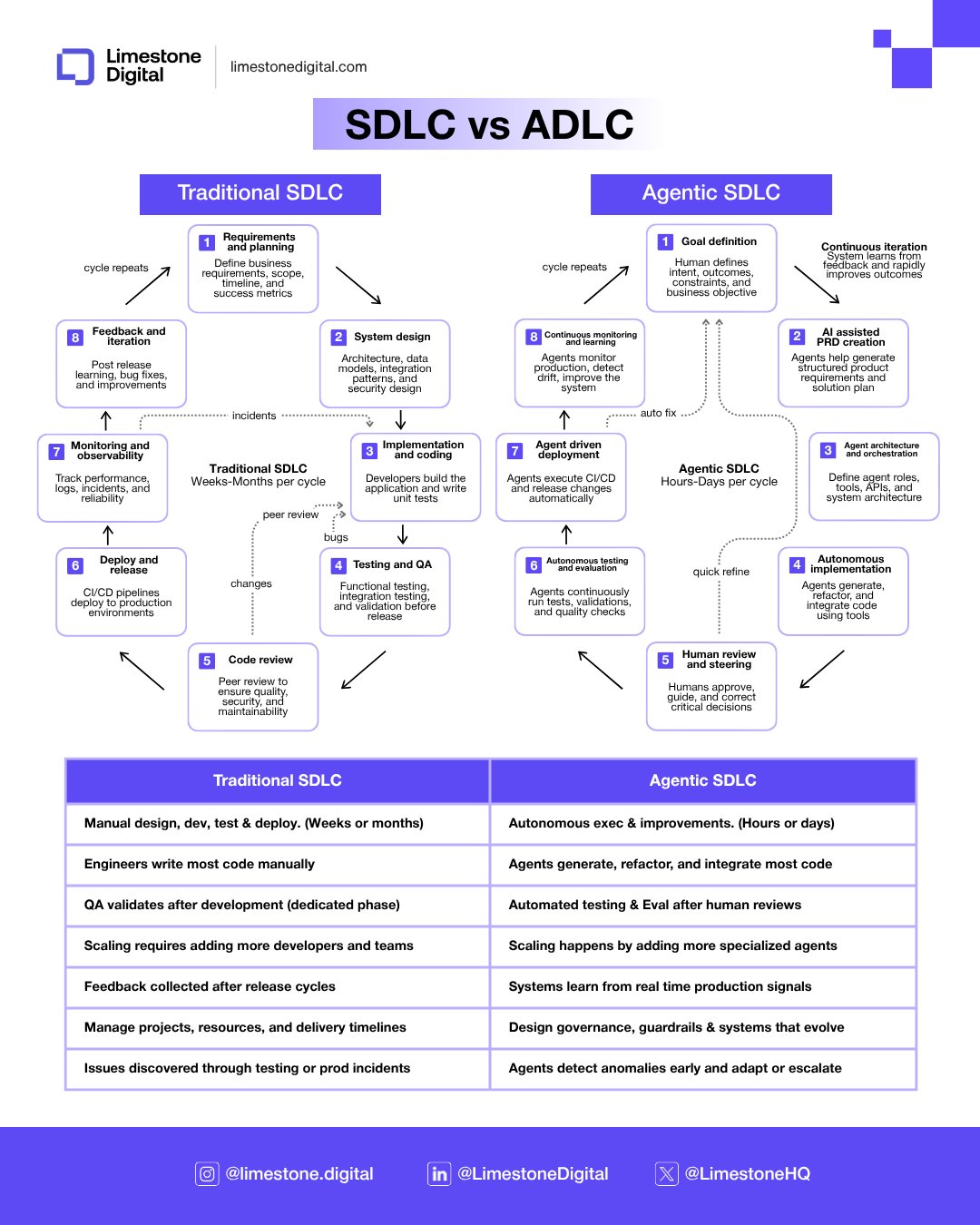
For Anthropic's stage-by-stage approach to integrating AI across the development lifecycle, see The AI-Native SDLC playbook.
Subagents
In the sections of Structured Development Process below, there are prompts for each stage. Now, with Claude Code, you can even create subagents based on these prompts to help implement the process automatically.
For example, you can create a backend python coding subagent to implement a feature, and a testing subagent to test the feature.
It's useful to have a verification system in place because the model often marks tasks as complete prematurely. Create a separate test subagent that is responsible for checking the work done by the code agent to ensure that the results are reliable. When the coding subagent says it is done, the test subagent will run the tests and let you know if they passed or failed. If they failed, the coding subagent will be asked to fix the code and run the tests again. This can be repeated until the tests pass.
You can also use subagents to parallelize tasks that are independent of each other. This can speed up the process.
Subagents are pre-configured AI personalities that Claude Code can delegate tasks to. Each subagent:
- Has a specific purpose and expertise area
- Uses its own context window separate from the main conversation
- Can be configured with specific tools it's allowed to use
- Includes a custom system prompt that guides its behavior
When Claude Code encounters a task that matches a subagent’s expertise, it can delegate that task to the specialized subagent, which works independently and returns results.
Excerpt copied from Anthropic documentation.
The Anthropic help doc has instructions for creating subagents. You can customize prompts like in the structured development processes below, and create your own agents.
Basic Example implementation from Ian Nuttall
To customize agents for your existing code, you can use a prompt like this
There is a feature in Claude Code called subagents, the documentation is at https://docs.anthropic.com/en/docs/claude-code/sub-agents. Please go through it and determine the best sub agents you can create for my app to improve my app and speed up coding time, then implement the subagents.
If you are using subagents, also add a rule to CLAUDE.md to use subagents for tasks that match their expertise, and parallelize tasks but do not overwrite each others updates.
You can even build a council of subagents to review each other and give perspectives. This Youtube video explains the idea.
Since the subagents feature was shipped, Anthropic has added new features including Skills and Plugins.
Claude Skills
Claude Skills are domain-specific “packs” of knowledge, instructions, and optionally scripts that Claude can load only when needed, keeping the context window lean.
Claude Plugins
Plugins are distribution containers that can include skills, slash commands, subagents, tools (via MCP), and hooks, usually installed into Claude Code with a single action.
They are focused on extending the Claude Code environment itself—defining how and when capabilities show up in your IDE/terminal workflow, and are often shared via marketplaces or repos.
You can find more about Claude Skills and Plugins on the Claude Code page of this website.
The Spec-Driven Plugin
The full methodology on this site is available as a ready-to-use Claude Code plugin. Instead of manually prompting through each phase, the plugin gives you a set of slash commands that orchestrate 15 specialized subagents — one per task — covering every phase from market research to maintenance.
Install it by adding the GitHub repo to your Claude Code plugin sources:
Commands
The plugin entry point is /spec-driven, which tracks sprint state and guides you to the right next step. Each phase also has its own command:
| Command | Phase | What it produces |
|---|---|---|
/spec-driven |
Orchestrator | Sprint dashboard, state tracking, loop-back detection |
/spec-driven:find |
1. Market research | specs/market-opportunity.md |
/spec-driven:plan |
2. Planning | specs/features.md, specs/feature-priorities.md |
/spec-driven:prd |
3. Requirements | specs/prd.md |
/spec-driven:techstack |
4. Tech stack | specs/tech-stack.md |
/spec-driven:appflow |
5. App structure | specs/app-sitemap.md, specs/ui-concept.md |
/spec-driven:design |
6. Architecture | specs/design-spec.md |
/spec-driven:implement |
7. Implementation | specs/implementation-steps.md + code |
/spec-driven:security |
8. Security audit | specs/security-audit.md |
/spec-driven:deploy |
9. Deployment | Deployed application |
/spec-driven:document |
10. Documentation | docs/ |
/spec-driven:maintain |
11. Maintenance | specs/maintenance-log.md |
All spec artifacts are written to a specs/ folder in your project root, created automatically on first run.
How to use it
Start with the orchestrator at the beginning of any project or sprint:
It reads (or creates) specs/state.md, shows you a dashboard of which phases are done, and recommends the next step. You can jump to any phase directly, or let it guide you forward in sequence.
The minimum viable sprint is just four commands:
The orchestrator also handles loop-backs — when a later phase reveals something wrong in an earlier one (e.g. implementation uncovers a missing feature in the PRD), it records the loop-back in the state file, marks the artifact for revision, and routes you back to the right command.
Agile, not waterfall
You don't need to complete all 11 phases before shipping. Start with what you need, ship something, then use /spec-driven:maintain to collect feedback and feed it into the next sprint. The orchestrator tracks sprint history and increments automatically.